Tuesday, July 13, 2010

One last Sunset for MO...ala HDR


I kept it "photorealistic" not surreal. The scene was surreal with the sun lighting the bottom of a clearing thunderhead at sunset that it didn't need any further digital help.

To have some detail in the shadows this was shot with rain drops falling bracketed +/-2EV (stops) and the resulting RAW files were run through Photomatix for the HDR file generation. The resulting HDR file was then tonemapped in Adobe's CS5. A little color correction was in order to remove the too much orange reflected from the clouds and voila "Cemetary Sunset" was created.


Elephant Rock State Park and HDR...


Among the spots I hiked was the Elephant Rock's State Park in the Ozarks of Missouri. It is an interesting are where gigantic boulders of granite were exposed after eon's of weathering. On any given day you come across way to many hikers to call it solitude, but even with them in the rocks its a pleasant way to spend some time, they just have a habit of being around to "ruin" shots of the rocks one wants to get for use arty reasons.

All of these were shot bracketed +/- 2 stops (ev's in the digital realm, but what the heck am old school) and from there the RAW files were blended into an HDR file using Adobe's CS5. The tone mapping was also done with CS5 and done so to maintain a photorealistic as opposed to surrealistic image.

Enjoy 3 images from Missouri's Elephant Rocks State Park.

Panoramic images in CS5


Woot its a party at the PC with CS5's multiple options for blending images for panoramas from several shots. You need to play around with them to get to understand how they take images and blend them together. What you need to know is I used "Spherical" as the option and used 3 basic jpeg files to get to the desired image with minimal distortion.

The actual file is HUGE...so I re-sized and dumbed it down to fit into a blog post. Suffice it to say its still a very large image that gives you a sense of the depth and views from atop Tom Sauk Mountain in MO looking over the St Francios Mountain Range that is with the northern Ozarks and is the highest point in all of MO.

Click away for a larger version for your viewing pleasure. I sure do pick nice places to explore over vacations.

Next is the wine growing regions of Santa Barbara County.

Tuesday, June 15, 2010

A Little HDR in the photorealism realm


I shot this from a balcony at the hotel we stayed at for a basketball tournament this last weekend. Pardon the noise....I used a high ISO setting to keep the shutter moving fast(ish).

I did the tonemapping with Photomatix...I like its controls better still than CS5 for capturing fine detail and the ability to micro control contrast.

Thursday, May 20, 2010

HDR Photorealistic option


'Nuff said. It works. Old image that the drop down not only teamed the demons of ultra contrast range but multiple colored light sources. Life is good when you want to be a realist and still use HDR generation.

Wednesday, May 19, 2010

Autochrome and CS5


I can get the feel, but not the same delicate images. I can create grain, but that is part of the equation. The original autochromes had potato starch that was died and outlined with carbon black. I can duplicate the color grains by adding noise and pointillising the image, but I can't get the black outline around the "grains" created in CS5.

I shall keep working on it, but until then here are two images in the style at least to keep me contented that I am on the right track. Once I nail it I'll post the step by step it took me to get there.

Tuesday, May 18, 2010

A little orton...of an area now burned out.


Concurrent to the Station Fire that wiped out so much of the Angeles Forest in the San Gabriel Mountains there was the smaller Fellow's Camp fire that did damage as well to the forest. I'll be heading up there in a day or so to see what wild flowers and other green has returned to the area. When I was last up there, much of the west side of the river was burnt to the ground and nothing but ash, but that was January before the rains really came in hard and washed stuff away.

Hopefully there was enough rain to ensure the wild flowers and stuff returned this spring. It will be many years before this view looks the same. Maybe I shall get a pic from the same vantage point and post as a comparison in the coming days? Maybe.

Monday, May 17, 2010

Another stab at painting...


This is quite the learning curve I am on. Right now am just learning one brush at a time to see what it does. This time around its a wet stiff bristled shorty. So far so good, what my next step after completing the learning about what each brush does...is to learn to combine them on one canvas like a real painter would do.

I have learned its a must to scroll in close and work top to bottom doing back grounds before the foreground or subject matter. It does make it much easier to bring about the feel of a painting.

Out of focus backgrounds are a challenge to blend and I am not completely happy with the result on this.

Iris. I have a ton of them, enjoy just this one.

Sunday, May 16, 2010

More with the magic brush...wet pick up and bold brush


OK...I haven't decided whether this is a useful tool in my kit or just a novelty. Regardless I am enjoying using it and learning what it can do. I see the potential to apply it to "real photographs" for some spot work as well as making paintings. The latter I think on watercolor paper will help the "painterly" effects even more.

What you see here is the original image and my rudimentary learning on how to use the tool.

A little surrealistic HDR work


The surreal tab in the HDR menu blasts contrast and details, leaving an end result not unlike how one would imagine a nuke blast looks. I kind of like it.

I've been sitting on this one for a little while, mostly because there were some huge power lines running through the sky that I just couldn't get rid of in old CS2, or at least delete them believably. In CS5 and the "content aware" fill as you use the "band aid" to remove them its another story. An otherwise distracting element rendering an image you want can be saved in CS5. (I should note the proper name for the band aid is "spot healing brush" with 3 other tools available in a drop down available by right click).

Saturday, May 15, 2010

more fun with magic paintbrush


This is actually kind of fun. Tedious with a mouse, but fun none the less. The magic paint brush lets you pic up color from the underlying layer whilst painting away. Blending and all that other stuff is done with adjustable presets allowing some of the underlying to show through, if you want.

In playing around with this tool I've discovered that the lower res, smaller files are easiest to work on and get acceptable results. I tried working on an 8 megapixel image and nearly lost my mind sampling small areas at a time and trying to paint. It is much easier to reduce the size of the image and dpi and work from there. The compression of detail doesn't matter, actually helps in putting together an impressionistic image...like Painted Jalama Dunes you see here.

I really need to invest in a pen and tablet if I am to explore this option further. Of course to get there I need to sell A LOT of prints.

Friday, May 14, 2010

One more orton and I call it a day...


This area is gone now, the Station Fire of last fall saw to the destruction of much of the Angeles National Forest in the Big and Little Tujunga Canyons. Sad, but I have this little bit recorded for posterity and it will be years before it looks like this again.

Fortnight Lily ala orton


Thankfully tools in don't change much and I can easily create layers and ortonize images. This is the Fortnight Lily aka African Iris that has been given the Orton treatment. Starting from RAW files as discussed earlier gives one a lot more detail to work with to start, the added bonus comes into play when working in the orton style in that you have highly detailed layers under the blur to add to the impressionistic feel of the final image. I like that.

Meander through the garden this morning...


With so much in bloom I opted to play in the garden with the camera this morning. I've been shooting and working from RAW for quite sometime now for a lot of reasons. Adobe's CS5 has some really powerful tools for taking that RAW file and getting it ready for use in photoshop with nominal adjustments needed. The advantage to this is that you are using all the data captured at the time of the shoot and have it available for use as needed.

Anytime you have an uncompressed file you have more to work with which helps. Of course to get it to fit here in downloadable fashion I do have to resize and reduce the dpi and save in jpeg fashion which unfortunately compresses out a lot of detail. In the end you get here a flavor of the final image, the real deal needs to be seen in person for the full effect.

The two roses are among my favorites in the garden. The pink one is "Shropshire Lass" that is a beautiful single rose that blooms just once a year. The yellow is my favorite of all the yellows out there. It too is a David Austin English Rose, and is named "Golden Celebration".

Thursday, May 13, 2010

Playing with paint brushes...


I'm intrigued by the variety of tools in paintbrush, specifically the "mixer brush" that allows you to pick colors from a background and paint on a new layer pick up "paint" or color from the underlying layer and mixing.

This image was worked with the mixer brush and using several different samples of color to fill in the sky and buildings for a painterly effect. I like these tools.

I think if I'm going to do anything bigger or more dramatic will have to invest in a tablet and stylus as doing this with a mouse is very tedious work.

Wednesday, May 12, 2010

RAW fun with Adobe CS5


Am enjoying the use of the RAW tools available in CS5. Much better than what came with the camera. I have to remind myself that the camera's program is 5 years old and programming and technology has grown in leaps and bounds since I bought the camera. This program has certainly breathed some extended life into the use of this camera body.

Enjoy the fish sculpture shot at the Santa Monica pier.

Tuesday, May 11, 2010

"smart content" really does fill in when objects are deleted


So here we go...I wanted to test the "smart content" option on the healing brush and use of magic lasso to delete objects but let Adobe CS5 fill in the missing object on its own. Beats the heck out of the old days where one would delete an object and have to use clone/copy to fill in the hole with something else in the picture then try to blend it in with brushes.

This is a pretty severe before and after. Can you count how many things I removed? The wall between photography and digital art has been broken down even further! (The images do get a bit bigger to see the differences and how well smart object worked. There was very little cloning and paint work needed on the edges for clean up which is a testament to the programmers abilities.

Removing "Ghosts" from HDR files....


Wow. Just wow. Finished the tutorial regarding HDR ghost removal as well as the one on "surrealistic" options. CS5 is just amazing.

Now, please don't get me wrong, but the ability to remove ghosts is as important as keeping them in. Why...solves out of registration issues. The plus side is if you want them there you can keep them there by simply not checking the remove ghosts box...that way objects in motion can remain in motion as a blur and ghosted if its important to the image.

This file was one I knew that had a lot of loops to toss at CS5 to see how well it would handle a variety of issues. Simple drop downs and I had a "surreal saturated high contrast" image and the ghost tool removed the moving cars that otherwise were blurred headlights streaking by. Changes the whole feel of the picture to have cars simply frozen in time and the blurs removed. It was just an experiment, but I liked the results.


Sunday, May 09, 2010

reworking a prior in CS5


I do believe am going to love the toolboxes in CS5. This gem started as a Photomatix generated HDR file but I did the tone mapping in CS5. Ultrareal was the approach and I liked it.

I have to admit I have a little OCD when working my files. I save each step of the way and code the step so I can go back to any point in time whenever I want to redo an image. That way I have a standardized start point and can rework the file until I have an image I like. Could explain why I filled up a terabyte external drive so fast....multiple files of the same starter image. Pays to back up externally as well as on DVD, just in case you have a multiple drive failure you still have a way to retrieve old files.

Sadly...the new machine doesn't have a "floppy drive" and I didn't back up any of the old files on floppy, but then again I doubt that I'd have much use for under 1megapixel files.

Friday, May 07, 2010

HDR in CS5


This part of the program has grown considerably...especially in the area of out of registration corrections. I can only imagine the programming that went into that one. But in short if you have something a little out of registration, like tree limbs or flags moving it will fix the problem by letting you select the frame that will serve as the master for registration purposes. Wow.

I'm not entirely convinced that the tone-mapping is as developed as that in Photomatix, but then again I haven't dug far enough into the program to see what I can do. So far working a "real" image as opposed to "surreal" the work is much easier to fine tune. Maybe its just an issue of figuring out which tool corresponds to that in Photomatix for the surreal effects? Nah, its never that easy.

Another tool I like so far is the "Auto tone" for minor color correction, I haven't thrown any curve balls at it yet like multiple light sources, but what I have done so far is use it to clean up the cyan cast that one gets with HDR file generation. It works well for that. Of course they have full photo filter layer correction available but its nice to see what it can do automatically before you start strolling down the custom paths.

CS5 and Black and White


Wow...the CS5 controls black and white so much better than the old CS2 which simply desaturated. This program handles the file as if it were really black and white to start with and gives preset options to control the effect of filters on silver, contrast filters on the photographic paper. The works. Even better than the presets that were on the "Virtual Photographer" plug in I used with CS2. Dudes...you did your homework nicely.

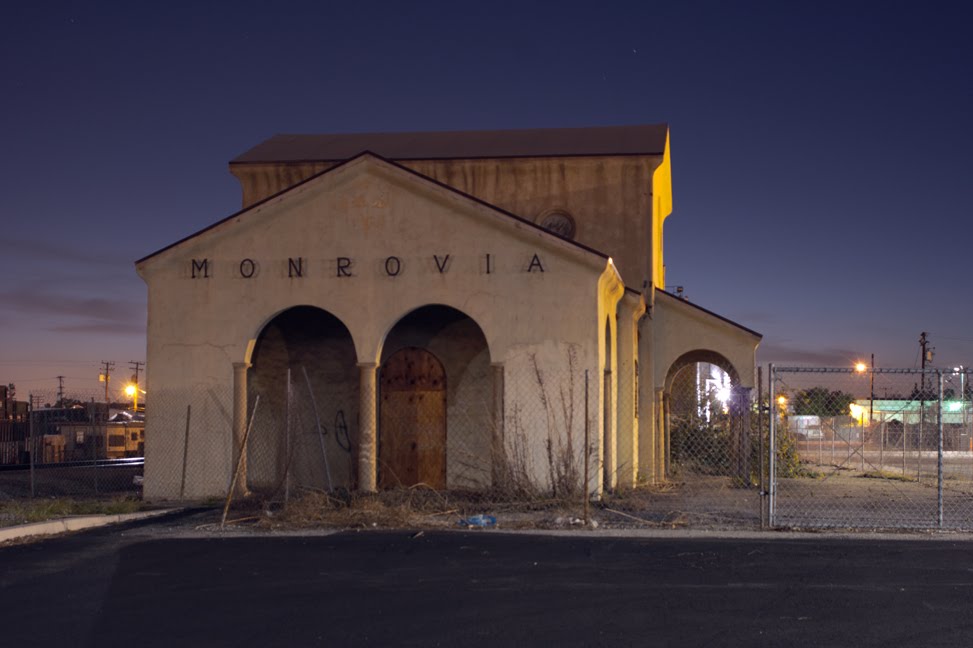
Enjoy "Monrovia" our old rail station soon to be rehabbed as a Metro Gold Line station in the coming years. The actual image will be available for auction at the Monrovia Association of Fine Arts big fund raiser the "Black Tie Event" on 5/15.

CS5 Arrived...and it really is an amazing program


IT still works like the old programs in terms of menu changes. The "magic healing brush" does an amazing job of deleting objects. In this case a big old sign in the middle of the picture.

The image was shot several years ago with an Olympic point and squirt 2.5mp camera...can you imagine that being state of the art? Ever? Anyway it was just random shooting in the early morning hours and I liked the composition just not the sign warning to stay alert due to a nearby prison.

I dug this out and took it upon myself to use the magic healing to remove a sign and then ortonized the whole image. Thank goodness I didn't have to learn new tools and what there was was so intuitive it really was nice.

Enjoy "Jalama Beach Dunes".

Wednesday, April 28, 2010

Oranges ala Orton...


Kind of getting back on track after a flare up of the dreaded CFS. I took this image at the new Monrovia Farmers Market that takes place on Sundays. Nice fresh produce and none of the swap meet atmosphere one gets at the Friday version. I like it much better.

The image is post processed in the Orton style that I detailed here earlier last year. Love the soft romantic look of the images that result.

Also...I got a new 'puter that is so much faster than the last. Its got the AMD Phenom Quad core 955 chip with a whopping 8 gigs of ram plus a host of other goodies. Since CS2 isn't entirely compatible with the new Windows7 OS am getting a copy of CS5, due to arrive next week, to take over with the post processing duties.

Tuesday, March 30, 2010

Pic for a blah day...no sun until 2pm today!


This "June Gloom" in March is for the birds. Especially if I want/need a bright sunny day for max contrast of wild flowers in bloom. Sadly the sun came out too late to do me any good with today's walk. Yes, I got exercise and some fresh air, but I didn't take the camera as it was just too gloomy for the bright and sunny frame of mind I was in.

So when the sun did oblige and show up this afternoon I just strolled in the garden and found this "Golden Celebration" English Rose by David Austin in full bloom and grabbed a pic.

Post for Monday 3/29

First Iris of spring has opened its beautiful bud for all to enjoy!

Saturday, March 27, 2010

Friday, March 26, 2010

Double Delight ala orton


Just one of a few early bloomers in my garden. Post processed from RAW in the Orton style. Love the soft romantic glow the process gives to the final image.

Thursday, March 25, 2010

Gnat on a wildflower


Can't plant stuff like that, wish I could, but there it was when I looked close through the old lens a couple of gnats feasting on the sugars being released by the bud.

Wednesday, March 24, 2010

Bush Sunflower past and present


I love how this plant can have a rebirth in the middle of its charred remains from a fire a year ago.

Tuesday, March 23, 2010

kalanchoe blooming


These little succulent beauties naturalize wonderfully here in sunny temperate So. Cal.

Pic for the day...it arrived


A while back I grabbed a pic of a grill ornament on an old roadster. The ornament was from the 1932 LA Olympics. A friend and fellow blogger Will Campbell saw it and wanted to use it for a T-shirt. Today my copy came in the mail. Am thrilled and will wear it proudly. His work in 'shop to isolate and halo-ize the ornament is terrific and looks awesome on a black"T".

Sorry the image is poor...it was done with the trusty cell phone cam.

Monday, March 22, 2010

Pic(s) for Sunday 3-21-2010


Same wild flower blooming in the desert just a couple of different angles. Cute, tiny little flowers like this lined the desert in PS over the weekend.

I like the first shot as it captures so well the harsh environment they live in, the second as its up close and personal in of the bud and bloom phase on the same plant.

Pic for Saturday 3-20-2010

This weekend was "Duel in the Desert" in Palm Springs. As luck would have it I was in a catch 22 with the laptop. I needed an update but couldn't access the internet until it was done. The internet at the hotel needed me to sign on with them first before I could proceed. End result was no 'net connection for the weekend which left me a little bummed.

I love existing light photo, even with fast moving sports. The blur of the players in motion conveys the action of the moment so well. (#15 is my youngest in action).

Friday, March 19, 2010

pic of the day...

Few things are as reassuring and magnificent as a tree leafing out in spring. Of course with it comes pollen which means allergies, benadryl and migraines for some. Moment to treasure or dread? You decide.

I forgot to post for 3/18/2010


Busy date day with the lovely better half and completely forgot to post an image for Thursday.

This weekend should be hectic in the desert and not certain if I'll have a reliable 'net connection to post. We shall see what transpires.

Wednesday, March 17, 2010

Blue Paint Trail and an exercise in framing


Funny how a shift from vertical to horizontal framing changes the nature and impact of a subject. Thank gawd that digital camera technology is advanced to the point where the camera senses the shift and automatically flip-flops your files so they are viewed correctly. How many remember the day you had to go through and manually do it so your thumbnail views were correct?

Tuesday, March 16, 2010

Lily


Phallic or yonic you decide. I love the sweeping lines leading to the pistol of this lily in full bloom.

Monday, March 15, 2010

Photo for the weekend


The weekend involved some excuses. Sorta lame but it happened. The folks came for the weekend and I spent it entertaining and cooking for them. So...no time out with the camera.

The image was shot at the end of last week and worked in the Orton style. Love the contrast between the scarlet flowers and the brilliant green of the out of focus foliage. No doubt which is the star attraction in the image. The soft in and out of focus of the flower itself is just what I was looking to get, then again the soft impressionist view of the world is what I do best.

Friday, March 12, 2010

HDR to the rescue...dark shadows and dark plants


This image wouldn't have been able to be captured and presented with all this detail had I just shot it for shadows or highlights. To much contrast for the limited range of a digital SLR let alone good old silver based films.

To capture all the details in the shadows and highlights and in-between I bracketed the exposures +/- 2 stops. An HDR File was generated in CS2 then tone mapped in Photomatix. The final post processing was done with virtual photographer to clear out the cyan haze and warm up the shadows a bit.

Thursday, March 11, 2010

First Rose of Spring


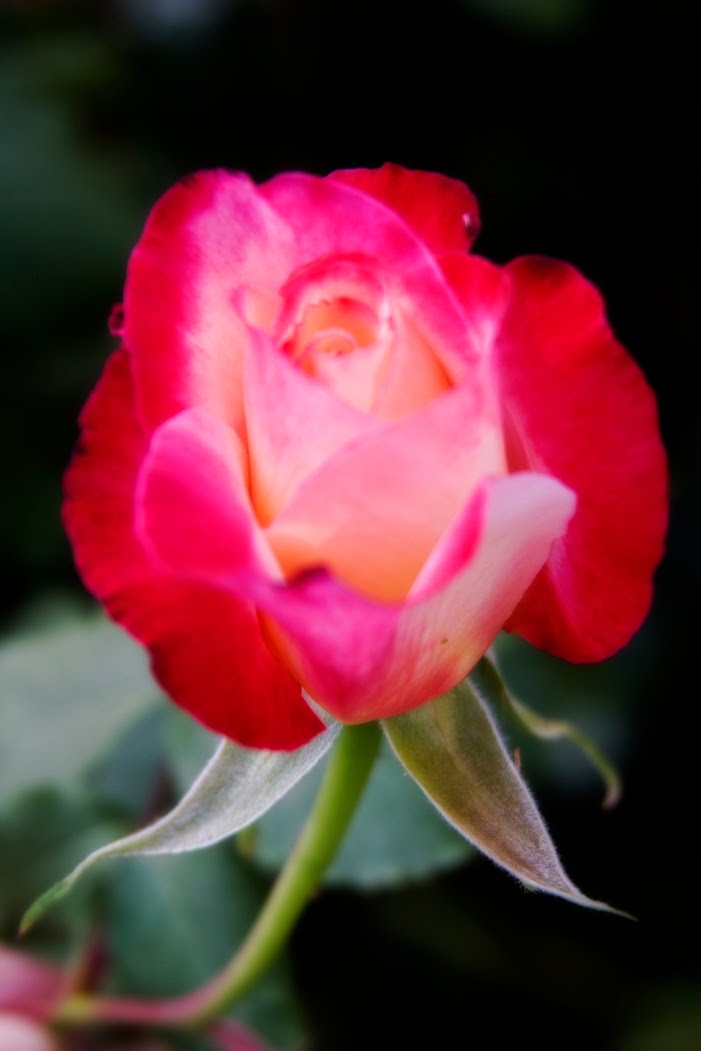
It is of the English Rose by David Austin named "Wenlock" . It is blooming a few weeks too early but I'll take it along with the other signs that spring and warmer weather is near.

As I love the soft romantic look of the orton style I opted to use that as part of my post processing from the RAW file. In simplest terms I create a duplicate layer as a new background, adjust saturation, increase exposure and blur the layer. Then I use the blending tool, on multiply most of the time, to create the final image. It is then flattened and run through Virtual Photographer to manipulate it further so it takes on the look of the old chromes (and isn't it a shame Kodachrome is going the way of the dinosaur) printed on Cibrachrome print material.

Enjoy my first shot at spring, hope it adds to your day a little bit with the promise of good things to come.

Tuesday, March 09, 2010